Watch the Demo
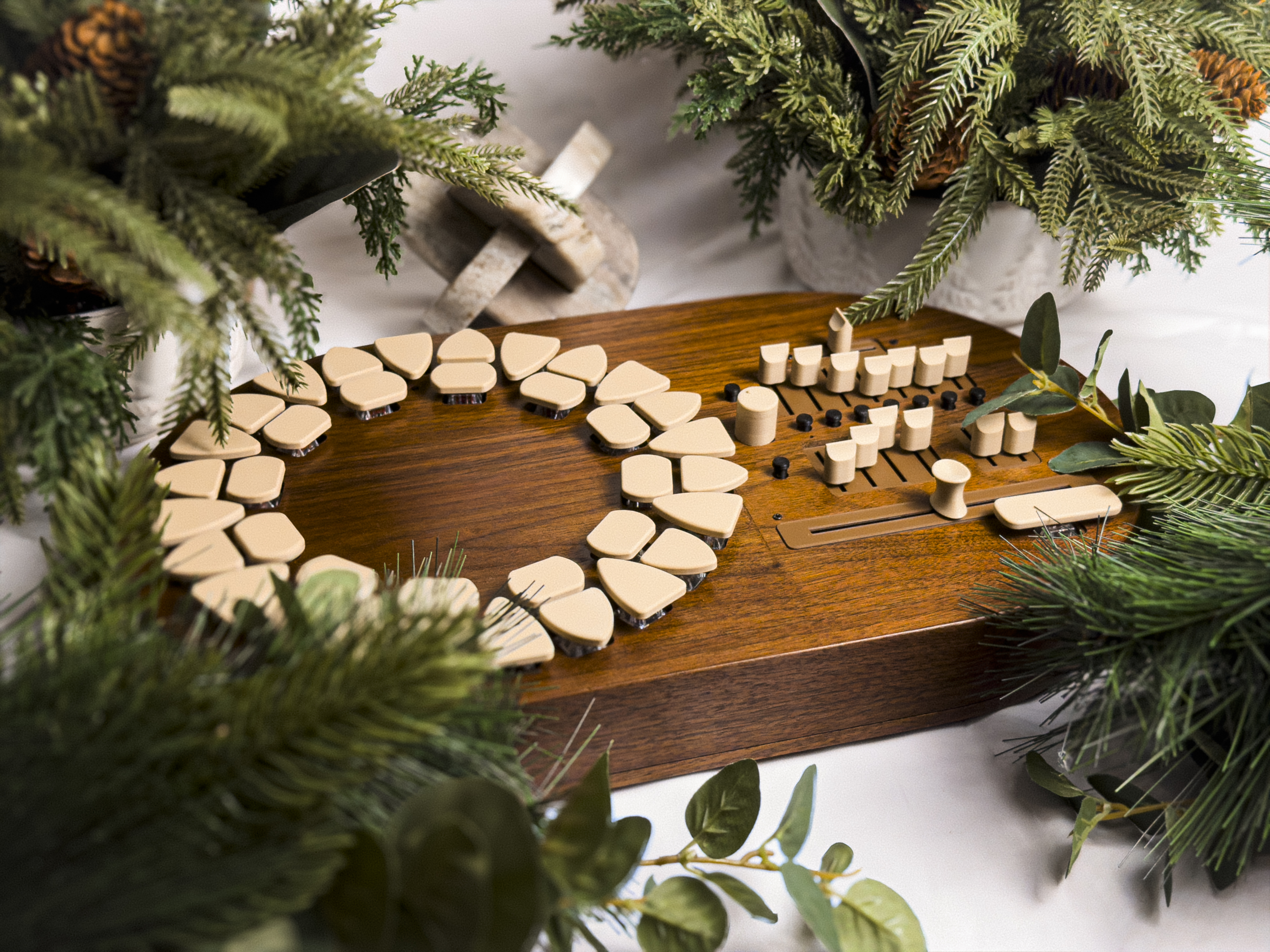
Nymira is a standalone harmony instrument designed around the circle of fifths. Its sonic engine draws from the overtone series, offering detailed timbral control across seven individual partials. Three distinct models explore different synthesis methods; one rooted in additive FM synthesis, another in classic subtractive design, and one based on granular synthesis. Together, they provide a new, expressive way to shape rich and complex harmonic textures.
Nymira is the only instrument in the world that maps the Circle of Fifths to a physical interface. Nymira is designed with Western harmonic theory at the core, allowing you to discover beautiful chord progressions that are much harder to play on other instruments.
Like all Terraphones, Nymira is assembled by hand, and is housed in solid walnut. Underneath Nymira’s keys are Cherry MX Silent Red keyswitches that offer a clean, tactile experience. With the ability to run on four rechargeable AA batteries, Nymira lets you play anywhere. Inside Nymira are two surface transducers that turn the walnut enclosure into a speaker of its own. Playing Nymira in this mode allows you to hear its warm sonic engine played through the walls of its walnut housing. Nymira also excels in the studio. It is equipped with USB MIDI out, and a stereo 1/4" audio output. If you don’t want to use batteries, Nymira can be powered via USB-C with any device that supplies 4-17 volts.
~~~
Nymira is made by Thomas Adam Billings, the sole creator of Terraphones. Every part of Nymira is ethically sourced, assembled by hand, with solid walnut sourced and milled in the United States of America. By purchasing Nymira, you are directly funding the ongoing research and development of a new wave of natural, electroacoustic musical instruments.
– $1200 –
Nymira's Features
Chord Buttons
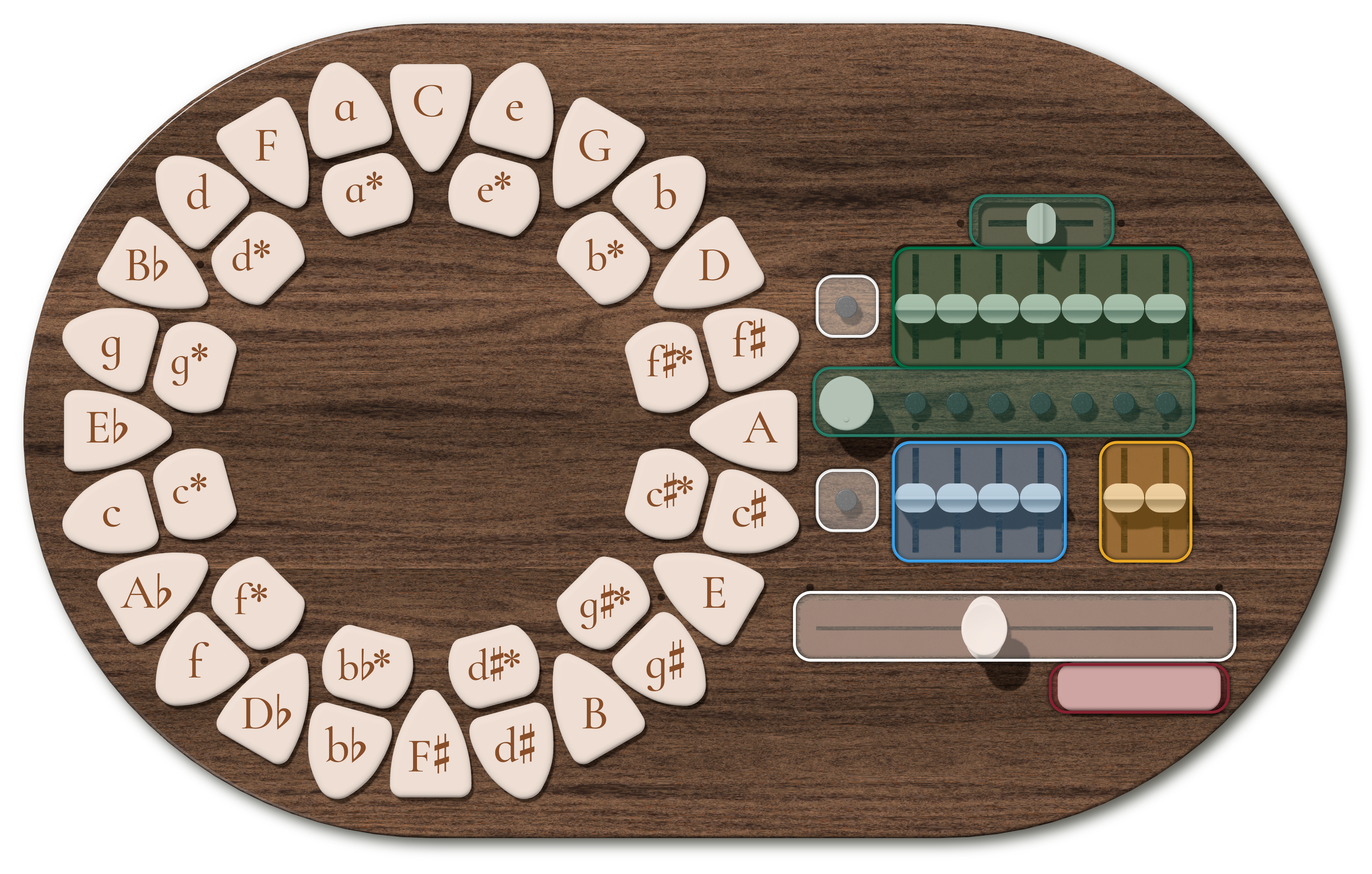
Major and minor triads are located on the outer ring of the circle. Pressing one of the large, inward-facing triangle buttons will play a major triad. Pressing one of the smaller, outward-facing triangle buttons will play a minor triad. Star keys are located in the inner ring. The function of these keys change based on what other buttons are being pressed. Any star key pressed by itself will yield a diminished triad. Pressing both a minor triad key and the star key below it will convert the minor triad into a major triad.
The uniqueness of this button layout is discovered when pressing multiple triad buttons at once. There are many button combinations that yield more complicated chords. Try experimenting with different combinations of adjacent and nearby buttons.
In general, pressing a triad button and adding extra buttons in the clockwise direction will yield typical diatonic extensions like 7ths, 9ths, #11ths, and 13ths. Pressing a major triad button and the star key directly clockwise will yield a dominant seventh.
Shift Button
Nymira allows you to play any chord with the shift button. When the shift button is pressed, all of the chord buttons only play their root notes. This gives you the opportunity to build and complex chord note by note.
Timbre Controls
Nymira uses a custom additive synthesis model based on the first seven overtones of the harmonic series. The row of seven faders gives the user control of the seven individual oscillators each tuned to the first seven partials of a given fundamental frequency.
There are two distinct ways to further customize the timbre of each individual oscillator. Pressing and holding the button below any oscillator will allow its tone to be customized via the horizontal fader above and the knob to the left.
Detuning
The horizontal fader allows the user to detune each individual partial either upward (sharp) or downward (flat). Experimenting with detuning certain partials will yield timbres that resemble metal bells due to the characteristics of overtone inharmonicity.
Frequency Modulation
Each of the seven oscillators has a built-in frequency modulation model. The user can select between a set of curated FM ratios using the knob to the left. Turning the knob fully counterclockwise will reset the partial’s timbre to a pure sine wave.
Filter Envelope
Nymira has a unique two-stage filter envelope interface. The left-most fader controls the attack length—from very short and plucky, to very long. The second fader controls the global cutoff frequency—the frequency that the attack stage will reach. The third fader controls the decay length, and the fourth fader controls the slope of the decay—from extremely exponential to linear.
Reverb
Nymira has a simple built-in reverb effect with two controls: Decay time (left) and Dry/Wet mix (right).
Manual Arpeggiator
The core of Nymira centers around the manual arpeggiator. This fader allows the user to treat Nymira as if it were a guitar or harp-like instrument. Pressing chord buttons and “strumming” the arpeggiator left and right triggers only the notes that are in the specified chord throughout the entire range of the instrument.
The arpeggiator is optimized to allow the user to strum at many different speeds and to quickly leap to different sections of the range without playing all of the notes in between. The user can briskly jump from one zone of the arpeggiator to another and Nymira will recognize this and only play the note that the user jumps to. This allows the user to play complex musical textures throughout the entire available range.
Function Buttons
Nymira has two Function Buttons that house many different features. For each button, different operations happen when you press quickly versus when you press and hold the button for around one second.
Top Function Button
Toggle Quantization (Press): The Quantizer button limits the notes produced by strumming to a specific tempo. The tempo is changed by turning the same knob that is used to select the FM ratios for the timbre controls
Change Strum Modes (Press and Hold): There are two strum modes. The default mode senses when you move the arpeggiator quickly, and will skip notes, allowing you to strum in the same direction multiple times, or to play specific notes in any pattern. Pressing and holding the top function button will toggle this feature on and off.
Bottom Function Button
Change Play Mode (Press): There are three unique Play Modes: Immediate Trigger mode, Bass Line mode, and Arpeggiator-Only mode.
Immediate Trigger mode is the default when Nymira powers on. When the user presses a chord button or multiple chord buttons, that chord is played. The user can additionally move the arpeggiator to play more notes in the chord. The voicing of the chord that is triggered is based on the location of the arpeggiator when the chord button is pressed.
Bass Line mode plays a lower single bass tone when a chord is initiated. The bass line in this mode is optimized to avoid awkward leaps, and its range shifts based on the progression of chords that are played.
Arpeggiator-Only mode gives the user full control of each note being played by moving the arpeggiator. Pressing a chord button will not play any notes; only moving the arpeggiator produces sound.
Change Voicing Type (Press and Hold): There are two voicing types that Nymira is capable of. The default voicing allows you to play through every note in the selected chord in “close position”, where no notes are skipped. Pressing and holding the bottom function button will change the voicings to “open position”, which allows for new voicings like Drop 2.
Alternative Models
Pressing both of the function buttons at the same time toggles between Nymira’s two alternative modes.
Subtractive Model
This model contains a Triangle, PWM, Saw, and Sine/FM oscillator, in addition to a low-pass filter. The seven faders from the original model are used here to control timbre as well.
- Triangle wave amount
- PWM wave amount
- Sawtooth wave amount
- Sine/FM wave amount
- Sine or FM ratio select (same as original model)
- PWM speed
- PWM amount
The four oscillators are editable in a similar way to the original model. Pressing and holding the button below a specific fader allows the user to edit that oscillator in two ways. In the same manner as the original model, the horizontal fader above allows the user to detune the oscillator. The knob to the left, in this mode, allows the user to transpose the oscillator according to the first seven partials of the overtone series, as well as one octave below (serving as a sub oscillator).
Granular Model
This model turns Nymira's original model into a simple granulator. Instead of having to move the arepggiator to strike different notes, the notes are constantly repeated in a granular style. The sonic engine in this mode is a lighter version of the original model, giving you full access to the first four overtones. The last three faders control the granulator.
- Fundamental
- First Overtone
- Second Overtone
- Third Overtone
- Spray: Changes how many notes in a chosen chord are heard at once. Moving the fader all the way down only plays one note, and moving the fader all the way up will play every note in the entire range.
- Grain Size: Changes how fast the notes continuously repeat.
- Jitter: Modifies the Grain Size fader, allowing for "drunk" rhythms, "Dilla Time", and all-out random rhythms.